Network Basics
Every request crosses several layers, and each layer fails in its own way. The application protocol (HTTP, DNS, SSH) rides on a transport (TCP or UDP), which rides on IP routing, which rides on a physical link. The OSI model names seven layers, but for everyday debugging you can get by with four questions: does the name resolve, can I reach the address, does the transport connect, and does the protocol on top behave. The diagnosis chapter walks through those questions in order.
Connection Setup
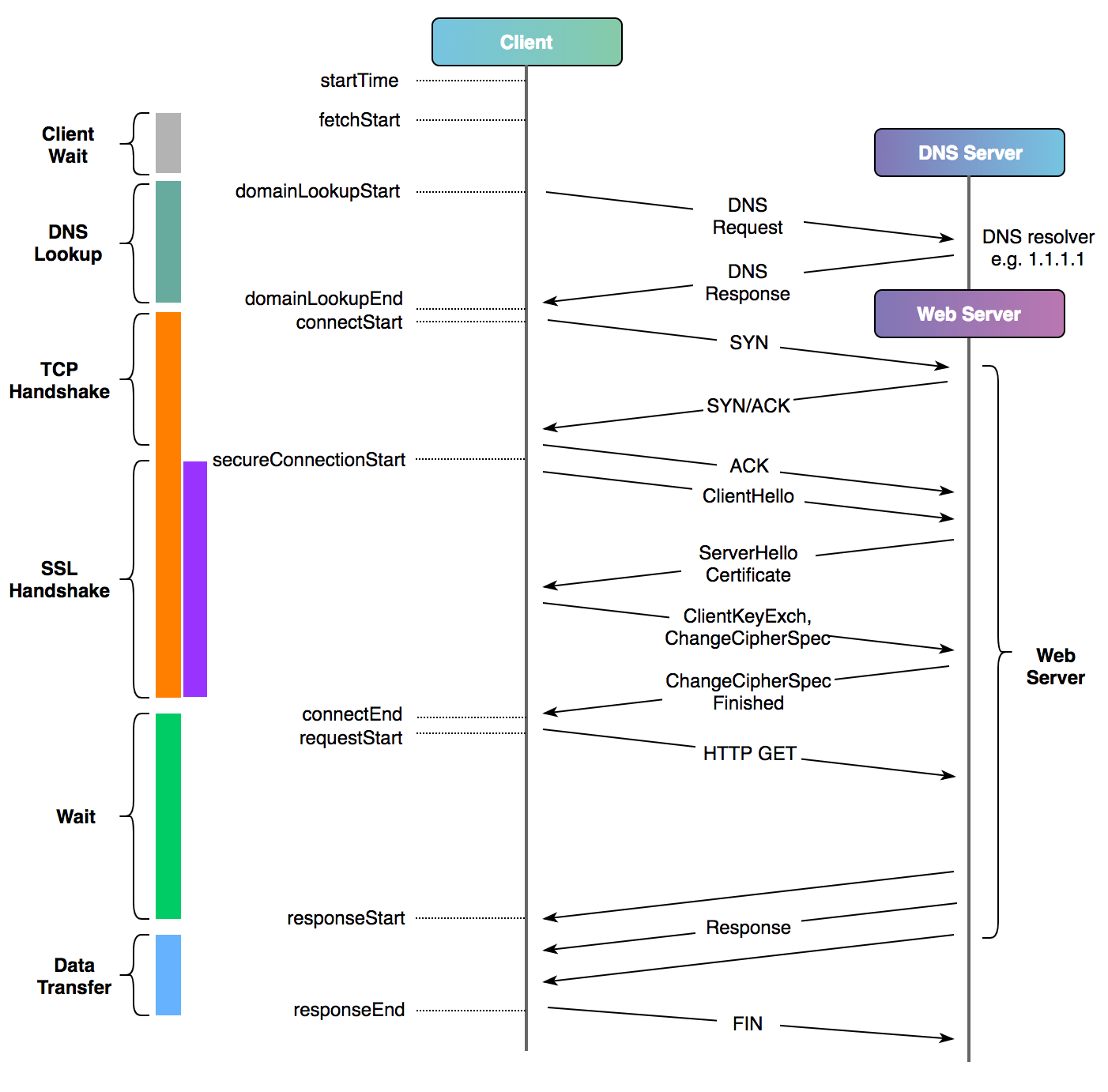
Before a single byte of HTTP moves, the client and server have already done a lot of work. Each step below costs at least one round trip, can fail independently, and has a tool in this guide that tests it in isolation.
1. DNS lookup. The client resolves the hostname to an IP address. If this step is wrong, everything after it is wrong too, which is why dig comes first in any diagnosis.
2. The TCP three-way handshake. TCP gives both sides a reliable byte stream, and it opens with three packets:
client  ── SYN ──────────────▶  server   "I want to talk. My sequence number starts here."
client  ◀────────── SYN-ACK ──  server   "Heard you. Mine starts here."
client  ── ACK ──────────────▶  server   "Confirmed."
After the third packet the connection is established and either side may send data. The whole exchange costs one round trip. Failures here are easy to read in a packet capture: a SYN that gets no reply at all usually means a firewall dropped it silently, while an immediate RST reply means the port is closed or a device refused the connection. netcat tests exactly this layer and nothing above it, and tcpdump lets you watch the three packets directly.
3. The TLS handshake. For HTTPS, the two sides next negotiate encryption on top of the open TCP connection:
- The client sends a ClientHello: the protocol versions and cipher suites it supports, plus the server name it wants (SNI).
- The server picks the parameters, sends back its certificate chain, and proves it holds the matching private key.
- The client checks that chain against its local trust store. This is the step that fails when a corporate proxy intercepts TLS or a certificate expires.
- Both sides derive the session keys and exchange Finished messages.
TLS 1.3 fits this into one round trip; TLS 1.2 needs two. openssl s_client performs this handshake and stops, which makes it the right probe when TCP connects fine but HTTPS does not.
4. The application talks. Only now does the client send its HTTP request and wait for a response. curl -w can time every phase above separately, so you can see exactly which step ate the time.
A cold HTTPS request therefore pays for DNS, one round trip of TCP, and one or two round trips of TLS before the first byte of content moves. The latency chapter puts numbers on what that costs.
Request Timing
Cloudflare’s post on timing web requests has a good picture of the whole sequence for one HTTP request:
Mutual TLS
In the handshake described above, only the server proves who it is. The client stays anonymous as far as TLS is concerned, and identity is handled later by the application (cookies, passwords, API keys).
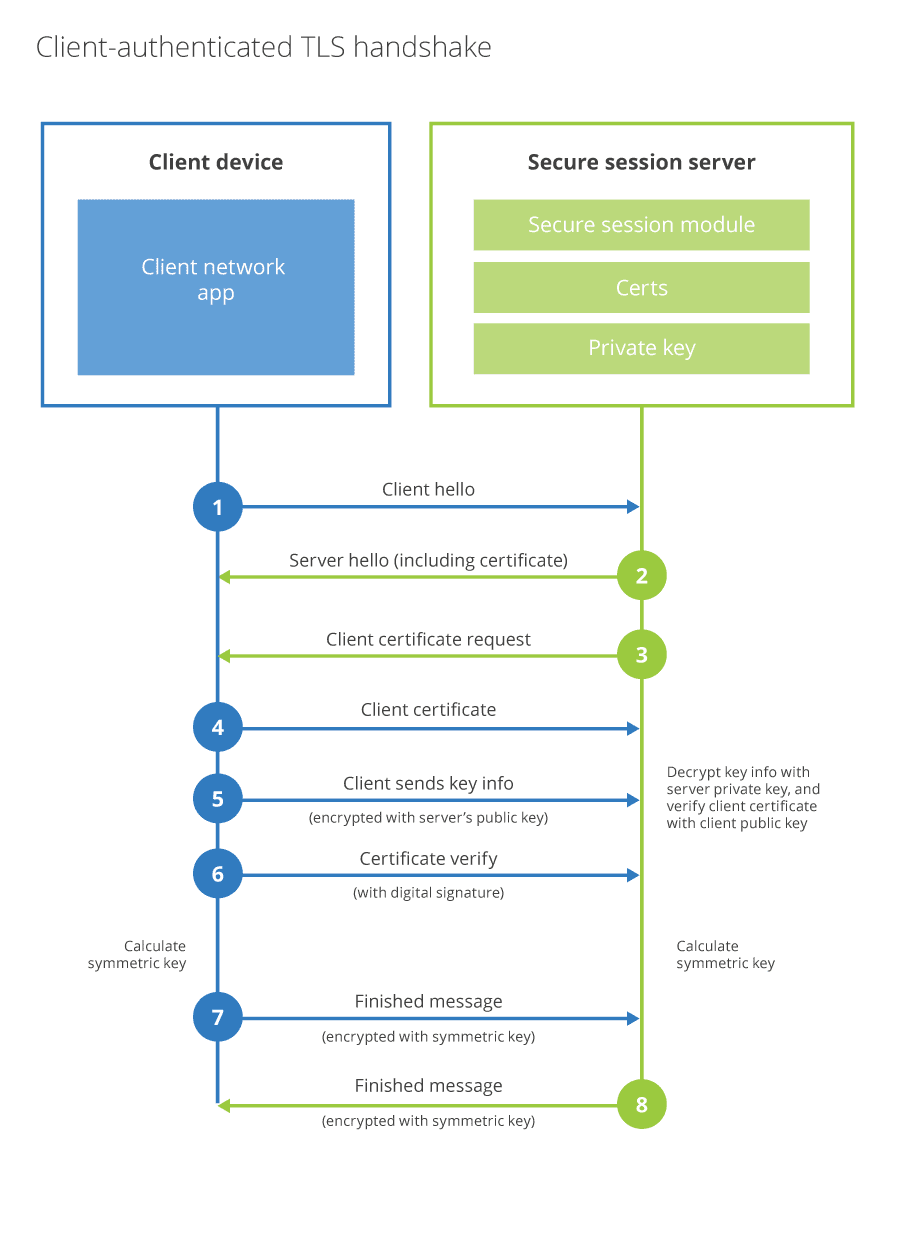
Mutual TLS authentication (mTLS) moves the client’s proof of identity into the handshake itself. The flow extends step 3 above:
- After sending its own certificate, the server also sends a CertificateRequest, naming the certificate authorities it will accept client certificates from.
- The client sends its client certificate, then signs a hash of the handshake with its private key (the CertificateVerify message). The signature proves the client actually holds the key, not just a copy of the certificate.
- The server validates the client certificate against the CA it trusts for clients. Both sides have now authenticated each other before any application data is exchanged.
When a required client certificate is missing, expired, or signed by the wrong CA, the connection dies during the handshake, before any HTTP status code exists. If you see a TLS alert (often certificate required or handshake failure) instead of a 403, think mTLS. To test, present a client certificate explicitly:
curl -sv https://auth.example.com --cert client.pem --key client-key.pem
openssl s_client -connect auth.example.com:443 -cert client.pem -key client-key.pem
Testing
- har-to-curl converts a HAR file (saved from the browser’s network tab) into curl commands, so you can replay a browser request from the command line.
Further Reading
- TCP/IP Illustrated, Vol. 1: The Protocols. Read it with Wireshark open and capture the protocols as you go.